Monday, March 19, 2007

Coming up for air, UniPhi 3.0 released

It has been a while between UniPhi blog posts, however the 3.0 release of UniPhi is now complete and deployed with existing clients, so far the feedback has been very positive.

Some of the key new features include:
  • Exporting UniPhi documents to pdf
  • Cost Management
  • Procurement Management
  • Improved rich text editor
Of the four major additions and improvements, the pdf rendering of UniPhi documents is the most interesting from a technical perspective. We are utilising XSL Formal Objects as a means of converting the XHTML output from the UniPhi document management system into a format which can then be passed through a processor to generate almost any format desired, PDF was obviously the first one we looked at, utilising third party library from Altsoft.

Writing the XSL transformations was completely new to me from a personal perspective, a new challenge is always a welcome addition to any software project and we are very pleased with the results.

Sunday, September 03, 2006

Upgrading MS Project 2002 Standard to MS Project 2003

A new issue has arisen in the integration of MS Project into UniPhi. Extra information is stored in MS Project 2003 Standard and Professional. This extra information requires changes to the database structure. This was not a problem initially as the original version of MS Project 2003 updated the table structure upon saving the first 2003 version into the database. However, this application is already onto its second service pack and in these patches is the elimination of this update functionality. Microsoft now supplies a SQL patch to update the database with the new fields and the one new table required for the application to run in 2003. Versions older than 2003 still function in the updated database structure and hence, we have included this new database design in the standard UniPhi 2.4 deployment.

Service pack 2 for MS Project 2003 (which includes the bug fixes of service pack 1) can be found here.

The SQL Script that updates the database can be downloaded here

Monday, August 28, 2006

Floating point error in SQL Server 2000 service pack 3a for MS Project 2000

After significant testing I have come up with the following information relating to the floating point error we have been receiving.

The error is created when data in the timephased data table is extended to many decimal places. However, it is not an error that will occur for all timephased records that have large numbers of decimal places.
The error is created when using MS Project 2000 (either original or SP1 versions) and the data is saved to SQL Server 2000 service pack 3a or before.
The error is corrected if opened by MS Project 2002 and saved BEFORE being corrupted (i.e. before saving it in MS Project 2000).
The error does not occur if the file is not corrupted and is being saved by MS Project 2000 into SQL Server 2000 service pack 4.
When the error occurs, MS Project does a partial write of the MS Project file and will start to save ok, appearing to be ok to the end user. However, data will have been lost in the execution and hence the recommendations below should be followed.
I believe that once all new files are created on the SQL Server 2000 service pack 4 database, the error will no longer occur. However, any files that have transitioned across from service pack 3a to service pack 4 have the potential for the error to occur.

For systems transitioning from Service Pack 3a to 4 I would recommend the following risk mitigation:

Open up all the project plans using a version greater than MS Project 2000 (i.e. MS Project 2002 or MS Project 2003).
Save the files
Re-map the files to their appropriate projects in UniPhi

If the error occurs after this, follow the steps below:

Delete the file in the live UniPhi database
Restore the UniPhi database as a new "temp" database.
Open up the offending file in a version greater than MS Project 2000 (i.e. MS Project 2002 or MS Project 2003)
Save the file
Save the file into the live UniPhi database
Remove the temp database.

Tuesday, July 25, 2006

Unicode SQL Scripts and TortoiseMerge

Version control is a vital part of collaborative software development. Being able to compare differences between files and resolving differences is a vital aspect of maintaining code in a repository. We use Subversion which is only supplied with a command line interface. The ability to expand and build upon open source programs like Subversion has allowed development of Tortoise SVN, a second program that acts as a GUI interface to Subversion. Its tight integration with Windows file explorer allows easy access to all the functionality of the commandline version.

Comparing differences between your current edition of a file and those in the repository is handled extremely well by Tortoise SVN. TortoiseMerge places the files side by side, you can compare differences per line. However, it needs to know how to display different file formats and currently Unicode isn't supported by TortoiseMerge. We only became aware of this after trying to compare SQL scripts that had been exported from the UniPhi database.

Exporting stored procedures, views and tables from Microsoft SQL Server Enterprise Manager using Generate SQL Script defaults to Unicode file format. By changing the file format to ANSI under the Options tab, you can start visually comparing files that use this format.

Monday, July 24, 2006

Keeping MSSQL Transaction Logs in Check

An essential part of maintaining any Microsoft SQL Server 2000 (MSSQL) Database driven application is a robust backup strategy, not only for the case of disaster recovery but also for keeping the size of your database transaction logs in check. By default, these transaction logs will grow over time to an infinitely large size, or if an upper limit is placed, the log file will fill up without scheduled maintenance, locking users out of the application.

The following Microsoft KB article is very helpful in this regard: http://support.microsoft.com/kb/272318/EN-US/

My recommendations for transaction log maintenance for UniPhi and related databases is as follows:

Since the ES2 (Innerprise Search) database is repopulated on a daily basis, the transaction log is not of a great importance, the following commands could be scheduled for backup purposes, keeping the log file size down:
BACKUP LOG ES2 WITH TRUNCATE_ONLY
DBCC SHRINKFILE(ES2_log, 100)

However for the UniPhi database, we do want to have the transaction logs available in case of an emergency, so:
BACKUP LOG uniphi TO uniphilogbackup
DBCC SHRINKFILE(uniphi_log,100)

Tuesday, November 29, 2005

MS Project

We have been working for some months now on a 2 site deployment of MS Project standard 2000, MS Workgroup timesheeting and centralised resource pool levelling. To say it has been a rollercoaster ride would be an understatement. Welcome to the world of "what on earth happend then" and "what service release fixed this bug". To be fair to the tool, we are trying to use MS Project for an awful lot on this deployment. It is a:
  • Time recording system for Accounts to charge labour costs to the project
  • Time recording system to improve the accuracy of estimation
  • Scheduling tool to commit deadlines to clients
  • Levelling tool to level resources across the organisation
  • Cost tracking tool to record forward estimates of actual equipment costs via purchase orders
And once interfaced to UniPhi
  • Project status tool for project managers
  • Dashboard reporting for information to sponsors
  • Team member task performance reporter
Some of the things that have gone wrong are:

To email out one timesheet, a user must create a master plan of all plans linked to the resource pool. Once completed, one timesheet that includes tasks for all projects a person has been allocated to work on will be sent to them. As part of the control process, this master plan was being saved as "Master Plan for date.mpp" Unbeknowns to us, what happends is that the tasks that are allocated are put into the users task list in Outlook (nice feature I here you say) however, the filename is used as the "category" for the task. If the task has not changed from one week to the next, then the category is not updated. When the timesheet is returned, the system looks for the weeks before's master plan (which no longer exists) and throws an exception, crashing the project plan and corrupting the data. So we no longer rename the master plan.

Similar issues come from renaming the resource pool. The resource pool currently links to 135 projects. When the file is renamed, these plans can no longer find their pool as they are looking for their old name. Hence, the all have to be opened and re-linked to the new pool.

If a user ticks a task in outlook, it then apportions the estimated work for that task across the timeframe of the task and allocates that time as actual work (not good when actual work has to be actual work and not an MS Project calculated estimate.

If a project manager ticks a task as complete then the estimated work for that task is copied to the actual work for the resources assigned to that task (again, not good when you need to report actual actuals). So they now have to zero out remaining work when a task is completed, as all the actual work should come from the individuals timesheet.

To get the full integration into UniPhi, we needed to save the plans into the SQL Server 2000 database. This has caused a whole host of issues including:

Project ID increments if saved in MS Project 2002 when the file was created originally in 2000
MS Project 2000 had a service release that fixed a bug relating to winproj.exe errors when opening plans through an ODBC database.
SQL Server 2000 has a floating point exception bug that wasn't fixed until service pack 4.

These are some of the joyful issues we have encountered throughout this deployment. However, when you look at where this company is going in terms of being able to properly commit to deadlines, forward plan, allocate work efficiently and on a prioritised basis to team members, track actual versus plan on costs and time, resource level and use theory of constraints practices to crash the critical path; we think the pain and suffering has been worthwhile.

UniPhi 2.0 Features List

UniPhi

We ran a workshop last week to define the features list of UniPhi 2.0 due for release on March 1st 2006. Thanks to feeback from our clients on issues/additions they require. The aim of 2.0 is to bed down the features that were released in 1.0 and to add easy to implement features. After much debate and soul searching, here is the features list per module of the system:

Online Document Management System
  • Allow the output order of a document to be different to the input order
  • Map on document's contents into various sections of another document
  • Create a document based off another document
  • Increase the number of object types in a template e.g Multiple file upload object, customised drop down lists, embedded reports etc.
  • Improved checklist of steps completed while populating a document
  • Allow for a document to be moved between projects

Change Control System
This feature slipped out of scope on release one and will be used to track project change requests.

Reports
  • Customisable dashboard reporting
  • More project status related reporting
  • Ability for reports to run in Firefox (our browser of choice)
  • Ability for end users to customise their own reports (could be dependent on SQL Server 2005 actually being released)
  • Potential for reports to be based around analysis services and reporting services rather than just reporting services

MS Project (cringe - refer to blog regarding MS Project deployments)
  • Integrate the resource management system with the resource pool that exists in Microsoft Project
  • Launch MS Project files from within UniPhi (requires an Active X control which has obvious security implications. We will be looking at alternative methods
  • Integrate tasks in MS Project into summary tab of My Projects

Timesheeting system (pending design phase review and may be de-scoped)
  • Allow users to enter time against tasks, issues, risks and documentation
  • Integrate the completion of tasks back into the MS Project plan stored in the database
  • Create a simple interface for timesheet entry that allows users to put time against any task scheduled for which they have been assigned to complete.
User interface
  • Improve the sort and filtering options
  • Allow for multiple summary views on the All Projects/Summary tab
  • Allow for documents to be launched in the documents tab not just the template section
Search
  • Add author, description and other meta tag data to the search results
  • Improve the ability to view search results by author
  • Look at taxonomy potential
Methodology
  • Improve the flowcharting integration into the library section
  • Improve the template party/role model interface and online help
So as you can see, it's quite a list. The next 5 weeks are dedicated to fleshing out the detail of this list and completing an initial design. From this design we will be re-estimating how long to build and test. Once we get this data, we will de-scope features until we can hit our March 2006 deadline.

Thursday, June 30, 2005

Uniphi Officially Launched

UniPhi, mbh's enterprise project and portfolio management system, concludes Beta testing today. We have delayed the roadshow of this software to early August due to the purchase of UniPhi by Bluescope Lysaght. Bluescope Lysaght at Chester Hill will be the first recipients of the UniPhi system. Deployment begins on July 11 and concludes a month later when the full team of Project Managers and Team Members will be trained. Next will be an upgrade for ILRIC Ltd in Armidale who have been using the previous version (methodology 5.0) for 12 months now. They are currently running a dozen projects that and are keen to utilise the new features incorporated into this latest release. Obviously, we are very excited about this milestone and look forward to communicating more UniPhi success in the near future.

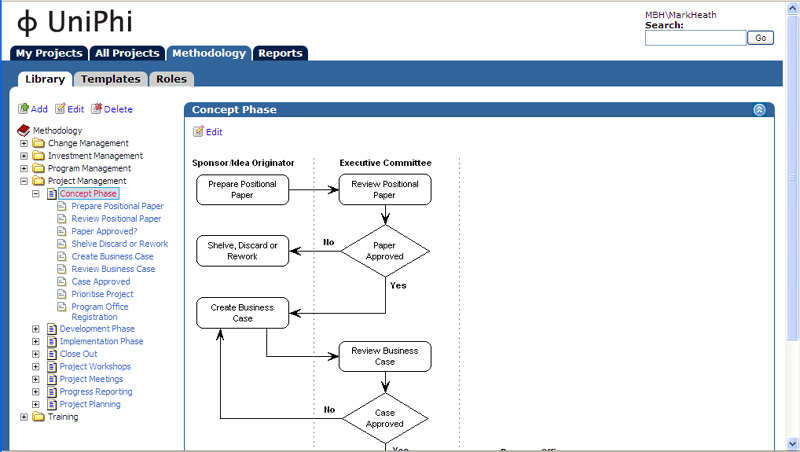
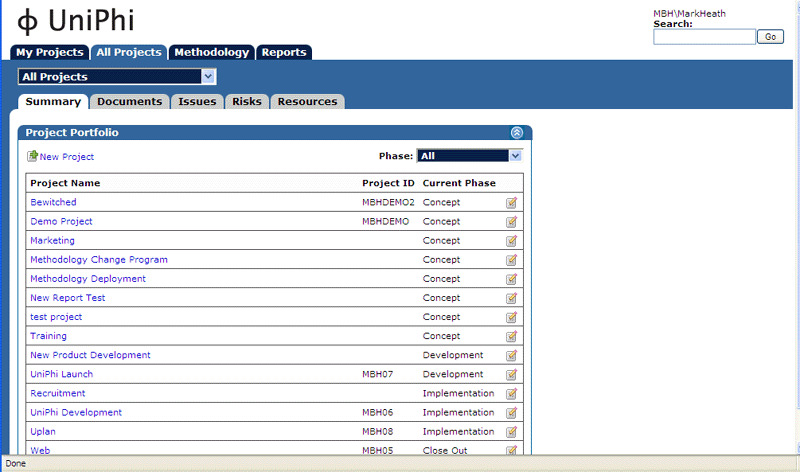
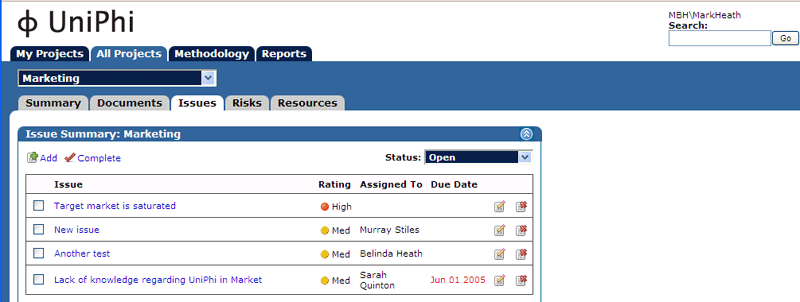
Here's some screen shots of our new baby!

Wednesday, June 22, 2005

UniPhi Templates and Document Management

UniPhi
I've been using the electronic templating and document management system a lot of late and it is the best thing in UniPhi. The ability to store and integrate components of the system into an integrative project management document like a business case or scope of work is just awesome. The system can uploan financial spreadsheets that are then incorporated into the end report, integrate issues and risks that have been created in the system into the end report and allow for version control, commenting, email, sign off and status control.

Well done Murray, an awesome piece of software!

Monday, June 06, 2005

MS Project Integration

UniPhi
Well, progress has certainly been made over the past month. All of the functionality is in the system and we are now currently Alpha testing with some of our existing clients of methodology 5.0. After running mbh for six years, we finally achieved a dream of mine; automated progress reporting. A combination of the ODBC connection from MS Project, SQL script that creates the MS Project table structure in MS SQL Server 2000 and SQL Reporting Services has allowed us to quickly generate some amazing high level reports. Of course the key to this is the capability of the organisation to efficiently maintain project plans. We are currently consulting to BlueScope Lysaght regarding this exact thing. I'll post an entry over the next few days describing how this piece of work is going and the end goal that is in mind.

The big news from this is their purchase of 30 UNIPHI licenses. They will be the first to receive this Release with our existing clients being upgraded soon after. BlueScope have made a commitment for another 70 licenses to be deployed at Port Kembla too. This will provide a user base nearing 300 and we hope the deployment and feedback will provide an even better enterprise project management system into the future.