Thursday, February 25, 2016

Benchmarking Series Part I - Data Capture and Quality Control

The Benchmarking Challenge

One of the biggest challenges for organisations when they want to benchmark is finding the relevant information in a way that is comparable across the things they're looking to benchmark. Perhaps user friendly software can help.

UniPhi's focus is on benchmarking everything cost and time related to construction projects. The range of this is almost endless and includes things like:

  • Average cost per m2/SF of floor area
  • Average elemental rates
  • Ratios between floor and wall areas
  • Revenue per net lettable area
  • Average duration of design phases
  • Average time to tender and procure 
  • Average time to achieve final account (We've gotten this down to two weeks for our construction clients)
  • Average percentage of variations to original price
  • Etc
Typically, this information is stored in spreadsheets and an email is sent around requesting people to send files for projects like XYZ. This is then consolidated and analysed by a BI team and hopefully some insights are obtained one to two weeks after the request went out.

Data Capture

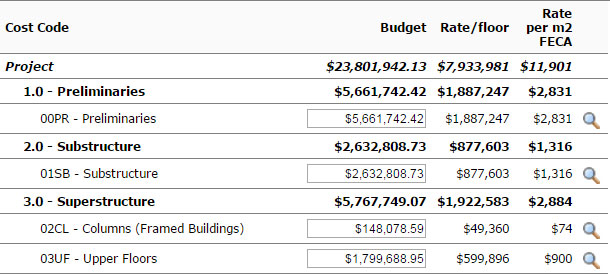
The way UniPhi has approached this issue is to make sure we integrate with as many underlying cost planning tools as possible and to streamline the process of importing an estimate into our Costs module. We then link this process to something of benefit to the person importing the plan. This is usually in the shape of assisting them to generate a report to a client (either internal or external). By making their life easier we have created an incentive to actually go to the trouble of importing the data into our application.

Classification

Once the data is captured, the next challenge is to make sure it is valid and to provide enough meta data or classifications to it to allow benchmarking end users to be able to obtain a collection of similar projects to benchmark against.

Firstly the meta data. All projects create in UniPhi require the classification of four customisable items to describe them. The out of the box labels for these are:
  1. Sector
  2. Project Type
  3. Service Line
  4. Location
Users of our software can then add an unlimited number of additional classification drop downs. The typical additional classifications are:
  1. Work Type
  2. Floor Area
  3. And some sector specific functional units like number of keys or apartments, theatres, or beds.
As these are mandatory fields when creating the project, you end up having classified a project as being in a Commercial Sector, Office Tower, Sydney, New Build,30,000 Sqm and 30 levels.

Add a project description and you've got a lot of information about the project already. The key with this meta data is that it is keyed in once. Then every piece of content created against that project subsequently inherits this meta data. So when the estimator or cost manager imports a cost plan into a particular project, the sector, project type, work type and floor area is automatically associated to this new piece of content.


Quality Control

At this stage we have a cost for a project and an association for the type of project but how do we quality control the data? This is where UniPhi's documents module comes into play. The documents system aggregates information stored in the rest of the application and workflows it to relevant parties for review and sign off. Only signed off pieces of information are available in the resulting benchmark reports.

Similarly, our new benchmark algorithm (See Part 4 of this series) relies on the certified progress claims of completed projects as the basis for generating phased forecasts.

At risk of stating the obvious, the quality of your information is crucial in generating useful benchmarking results, and with some simple rules and workflows embedded in the software, we believe this is not as difficult a task as it once was.

Results

Once we get lots of projects captured in our database, benchmarking is as simple as the query interface and resulting data set of sample projects ready for comparison.


Wednesday, February 24, 2016

Benchmarking - 4 Part Series

After a bit of a hiatus, the UniPhi blog is back. I have taken over the job of writing a weekly blog entry covering key problems our software is trying to solve. Over the next 12 weeks I will publish 3 new blog series with 4 articles in each series. The 3 series will cover the following key functions of UniPhi's software:

  • Benchmarking
  • Contract Administration
  • Cost Management
These three areas have become key areas of our application for our clients and we believe our approach to these areas is unique. Probably the most successful of all has been in benchmarking where we have been able to win back to back Australian Business Awards for innovation.

It is true that most of the work in this area has been for one of our fortune 500 clients (AECOM) and they won an excellent end product called Guide that provides their clients with benchmark data as well as the ability to price new projects within seconds using some key design parameters and the law of large numbers.

However, we have recently been able to take some of the learning from this work and incorporate the ability to capture key metrics into our application that due to its portfolio nature, already had significant benchmarking capability. This will be the topic of my first blog entry to be published tomorrow.


Friday, September 04, 2015

Managing the things you can't control

We recently released a white paper focused on complex projects in the construction industry and how creating a more adaptive and agile environment can assist in managing things that are beyond your control (you can see the media release and download the paper here http://uniphi.com.au/press-release/whitepaper-managing-the-things-you-cant-control/).

What's been interesting since  is the number of articles in the mainstream media of a similar nature. What's even more interesting is that most of the commentary is how there's nothing you can do to influence a companies reaction to things beyond your control. One example was the Qantas results. Matt O'Sullivan wrote an excellent article where he quotes ex Qantas economist Tony Webber as saying in relation to Qantas' big turnaround in profitability "You can't criticise him but I still think that a lot of it has to do with things completely beyond his control – most of it, in fact"

Read more: http://www.smh.com.au/business/aviation/who-won-the-war-between-qantas-alan-joyce-and-virgins-john-borghetti-20150821-gj4n52.html#ixzz3kievyMhV
Follow us: @smh on Twitter | sydneymorningherald on Facebook

Our view is that the best CEOs manage the things beyond their control by creating organisations that are made up of agile teams that can adapt to where the wind blows. Doing this means that if things are bad your less bad than your competitors and if things are good you're doing even better. And, we believe we've built software that can help those teams notice which way the wind blows and collaborate quicker to adapt. One key to this is transparency, which will be the topic of our next white paper due out next year.

Friday, August 14, 2015

UniPhi wins 2015 ABA100 Australian Business award for product innovation!


Yay! UniPhi has won an ABA100 award for product innovation at the 2015 Australian Business Awards. This year we entered the product innovation category for the work we have been completing for AECOM. In 2012, our enterprise portfolio and project management software was rolled out globally at AECOM as the precursor to the Global Unite program. Global Unite is a sophisticated integration project designed by UniPhi to capture and store project information created by the fortune 500 engineering company.

In 2014 UniPhi was recognised as an ABA100 winner for Innovation in the Australian Business Awards and we have proudly displayed our award through our website, emails and proposals over the past 12 months. It has made a real difference to the way the market views our business.

UniPhi again being recognised as an ABA100 winner for Product Innovation in the Australian Business Awards 2015 demonstrably shows our commitment to products and practices that challenge the status quo. We look forward to updating our marketing with this new honour and highlighting the product awarded as we strive to meet the potential described.

GUIDE - the product that has been recognised in the award, is the end reporting interface of the Global Unite project. It is a iOS app, an Android app and a web app that allows end users to view benchmark information as well as develop early stage cost estimates for an enormous range of projects and asset types including hotels, office towers, stadium, museums, libraries etc.

The parametric model that drives Guide has proven remarkably accurate in its estimating capabilities, meaning that AECOM clients can get answers to key strategic construction cost questions in minutes instead of weeks.

The Guide web and mobile application has the potential to revolutionise the way early stage construction decision making occurs. By partnering with AECOM,we have the capability to make this potential a reality.

This is a very proud day for us at UniPhi and we thank all the people at AECOM for assisting us in its development. Specific thanks go to Karen Wood who has been the AECOM project manager since project inception back in 2012. It has been a pleasure to work with Karen and the broader AECOM user base who provide proactive feedback and positive support that have led to the things we have achieved.

Thursday, May 28, 2015

Pecha Kucha night...

Mark Heath has teamed up with fellow PMO Sydney Meet up members, including Sandra Arps, to present at a Pecha Kucha night in July. Mark's topic of the night: 'Designing the perfect concept workshop'.

In case you haven't heard of this kind of event before, here is the run down:

"PechaKucha 20x20 is a simple presentation format where you show 20 images, each for 20 seconds. The images advance automatically and you talk along to the images." (source)

It is an event that is now held in over 800 cities around the world (the first one starting in Tokyo in February 2003).

https://stocksnap.io/photo/1CA9B8B930


So why was this event created?

"Because architects talk too much! Give a microphone and some images to an architect -- or most creative people for that matter -- and they'll go on forever! Give PowerPoint to anyone else and they have the same problem." (source)

We hope you can attend this event, we look forward to seeing the results of the creative twist that Pecha Kucha has on presentations.

Here are the details:


Wednesday, May 13, 2015

UniPhi for the... Independent Verifier

It's interesting to see how different people and teams utilise UniPhi to meet their business needs.

Here's what the Davis Langdon team said...
The Davis Langdon Verification Services department is responsible for verifying works on major Infrastructure projects throughout their design and construction phases.

On a daily basis our independent review teams deal with large amounts of email to and from external stakeholders including D&C Contractors and government agencies. We have been using UniPhi’s “Save as Issue” feature for a number of years now, and we have found that it saves us an incredible amount of time. Our project teams save all project related emails into the UniPhi system at the click of a button indexing them on the way in. These emails are then available to be viewed by all project team members and all related correspondence is traceable, captured and classified as necessary.

This simple feature has reduced our reliance on individual email accounts such that we no longer need to search through multiple personal inboxes, sent items, deleted items etc. Instead we go straight into UniPhi and find out exactly what is happening within each project and activity subset.
https://stocksnap.io/photo/UDIGU0A2SN

When we first introduced the Save as plugins, we saw the benefits of the feature. The biggest benefit to using both the Save as Issue and Save as Document plugin, was the time and efficiency that it provides. You can upload the email into the relevant issue it is concerning, there is no need to forward or store your email. Thus, you save time, and guarantee that the email you received is communicated through to the right people, and you know it's safely stored in the issue.

As you may have read in the previous blog post, the Save As Document Plugin, allows you to save your email and/ or attachment, into a UniPhi Document. This is useful as well, because if there is a follow up email, you can simply update the version of the document.

Check out the issues plugin here and documents plugin here. Plus hear the difference in our videos over time ;-)


Our life is frittered away by detail. Simplify, simplify.
Henry David Thoreau, Walden and Other Writing
 

Tuesday, May 12, 2015

New Feature - Communication tab

As part of the new release of UniPhi 11, the new Communication tab has been introduced. The Communication tab is one of the newest additions to the UniPhi platform, and has impressed users with how it neatly and concisely presents all interactions live in one space. The user is able to quickly and easily locate specific interactions, or get insight into what has occurred to date on a particular project, or across the portfolio. The Communication tab is ideally suited for use as a Customer Relationship Management (CRM) tool.

What is the Communications tab, and how does it work? 

The new Communication tab displays all forms of interaction that have occurred across your entire portfolio of project activity. In some ways it can be viewed as a transaction log. The information that is displayed is an aggregated view; a window into all of your UniPhi data. It's very important to note that there is no data input required (or even possible) within the Communications tab. The true value comes from viewing the data that has already been entered by each member of every project team. As the Communications tab does display all of those interactions, it is in fact a very broad, comprehensive, and powerful view of information. The interactions that the communications tab displays includes all Issues, issue actions, issue comments, all emails (sent from UniPhi), and all UniPhi documents. All of this information is displayed regardless of status, due date, or ownership.


To simplify the comprehensive view of information, UniPhi has filter options so that you can hone in and focus on the specific view of information you require. So as well as the standard UniPhi filters (Sector, Project Type, Service Line,  Location, Life cycle, and Project) the Communication tab features some new filters which allow you to filter according to; project Role, communication Type, and communication Category.

No more standard filing structure!

UniPhi's integration with Outlook and the party role model that sets up a users rights, access and role on a project can be used to provide enormous amounts of intelligence about activity that is undertaken within the system. For example, when you save an email from Outlook into UniPhi we not only capture the email contents but also who sent the email and who was on the To/CC list. If these people are in the UniPhi resources module then we also know what organisation they're from, what site/office within that organisation they are located and their role on the project that you saved the email to. The communications tab presents this information to you dynamically without the user having to think about where to file the email (all they need to do is select the correct project the email relates to). Equally, if a user enters information into the system, we know what role they're in when entering that data, what organisation and site and even where they were (if entering via a mobile app) when they entered it.

UniPhi as a CRM

All this means with some slight tweaking and the viewing of campaigns/ leads as projects/issues to solve, all this flow on benefits can make UniPhi a powerful CRM tool.

Click here to check it out.

Wednesday, April 08, 2015

PMO meetup a success!

It was 6pm the day before the Easter long weekend, but that didn't stop the eager attendees that showed up to the PMO Meetup! Some of the hot topics covered by Mark Heath on the night...


The night proved to be a success, with Mark's presentation receiving positive feedback! Check out some of the comments post meetup:

"Another great event and a fabulous talk. Thank you Mark for your thought provoking presentation!" Sandra (Organiser)

Photo taken by meetup attendee Philip Reid of
Mark's presentation


"Awesome meet up. Special thanks to the organizers for organizing the meet up. Great presentation by Mark." Parag

"Enjoyed tonight. Great presentation and venue. Thanks for a good event" - Mark Schild

Watch this space for announcements on Mark's future presentations...

Wednesday, April 01, 2015

Imagine - no reporting, no email, no inbox

Imagine freeing up as much as 25% to 30% of your time and the time of your entire workforce!
In Australia the typical employee works 39 hours per week. So saving time through efficient work practice is a very important consideration, especially when 30% equates to 12 hours per week, per employee!
Now image what your organization could do with all that recouped time. It might be possible to commence more projects, or complete your current projects in a shorter period of time. UniPhi turns the old adage "do more with less" into a reality.

How does UniPhi empower your organisation to realise these time savings? UniPhi has been designed with time efficiency as its core value proposition. Concepts such as entering data once, and reusing it many times are ingrained to our design principles. The decentralised data input philosophy is a classic example of this concept whereby each member of the project team contributes to the overall status of the project. The result is that the status of a project can be seen in real time, without the need to manually compile a project status report, which is out of date and incorrect due to the time it takes to produce. More recently we have been focusing on the elephant in the room - email!

In a recent post by Sara Larsen, reference is made to a Microsoft article that summarizes the inefficiencies of email by stating:

50% of emails can be deleted or stored in a folder

30% can be delegated and completed in less than two minutes

20% can be set aside in your task list to complete later

At UniPhi we believe this is true, and probably understated. So features such as our Outlook plug-in that allow you to save an email as a UniPhi issue, or to save an email as a UniPhi document have been greatly received by our clients. 

Do away with email all together!

With our cloud offering and a commitment from the enterprise or project team, we believe you can do away with email all together. Now without emails, you're probably thinking...how will I communicate with my colleagues?!?


Screen shot example of an issues list in UniPhi

Issues are the central hub of information for your project team. Each issue can be assigned an owner, as can the various tasks required to resolve the issue. Fortunately as UniPhi is a cloud based platform you can access your issues within UniPhi at any time, and anywhere (i.e via UniPhi Onsite). It is so simple to view issues across your portfolio, or within a specific project and see exactly what is going on. The information is live, its extremely useful, and it saves a an incredible amount of time. Being able to save emails directly into an issue or document adds to the beauty of the issues tab.

Your project team will appreciate the freedom to get on with the task at hand without attending "around the table update" meetings. And your Project Managers, and Project Management Office will love not having to write project reports and compile portfolio status reports. Not to mention the time UniPhi saves when looking for a document.


Imagine not having to waste time forwarding, delegating or sorting emails to a folder, and I'm sure we all have the mysterious miscellaneous folder, that, let's be honest, is pretty much a black hole. So instead of losing those important emails, store it in a Document or an Issue in UniPhi and rest assured that it will always be visible and locatable by your project team, within the correct project.


No reports to write or compile, no lost documents to locate, no lost emails, and no status update meetings to attend! What will you do with your 12 hours?

A desk of reports by
 a user who hasn't
 discovered UniPhi

VS
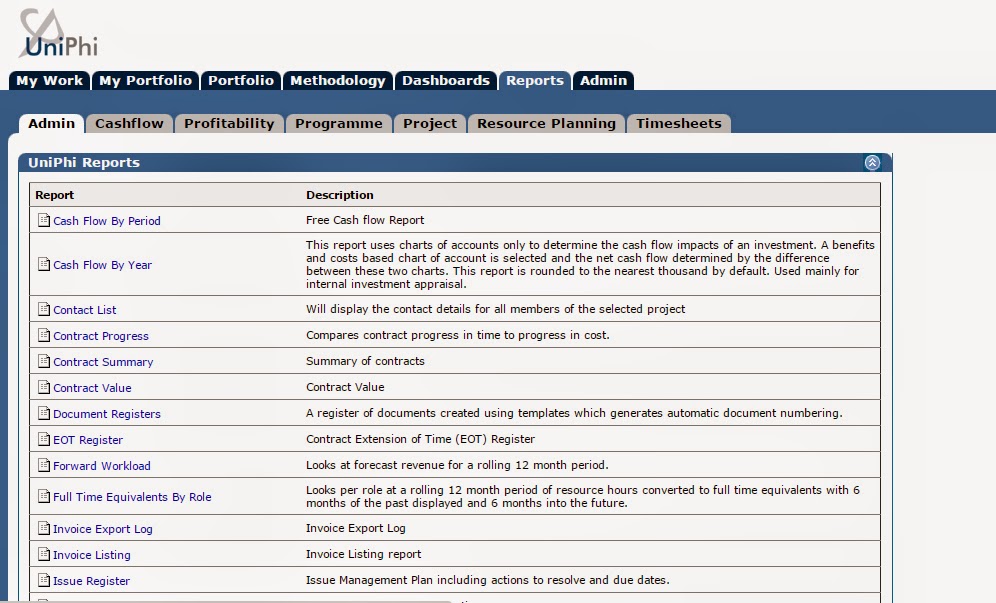
Screen shot example of reports, neatly organized and
manageable in UniPhi
No reporting, no email, no inbox.... Imagine no more!

PS. If you are in Sydney, why not come along to the PMO MeetUp on 2nd April and hear from UniPhi's Managing Director, Mark Heath. Spaces are limited!

Mark Heath featured in the April 2015 issue of INTHEBLACK!

While your looking through the April 2015 issue of INTHEBLACK, check out this article written on Mark Heath, Managing Director of UniPhi, on Page 25!


What an amazing achievement for Mark and UniPhi!

In case you'r not too distracted by that winning smile, have a read of Mark's article written by Chris Sheedy. It's a great read, and paints a clear picture of what UniPhi is all about.

A sneak peak...
"Everybody says that you can't do that, but we believe you can..."
- Mark Heath.
Inspiring words, with an inspiring vision.